플레이 콜백
Kollus VOD는 콘텐츠 보안 및 권한 관리를 위해 플레이어 재생 시작 시점에 고객사 서버의 승인을 받는 플레이 콜백(Play Callback) 기능을 지원합니다. 시청자가 재생 버튼을 클릭할 때 실시간으로 호출되며, 고객사 서버로부터 유효한 승인 응답을 수신한 경우에만 콘텐츠 재생이 활성화됩니다.
유의 사항
- 채널별 제어 정책: 콜백 URL이 설정된 채널은 모든 재생 요청에 대해 서버 승인이 필수입니다. (미설정 시 승인 없이 즉시 재생)
- 식별자 필수 포함: 재생용 JWT 생성 시
client_user_id파라미터를 반드시 포함합니다. - 오프라인 재생 제한: 시청 기기에 저장된 콘텐츠의 재생 제어는 DRM 다운로드 콜백에서 처리합니다. (참고: DRM 다운로드 콜백)
콜백 설정 방법
콜백 URL은 Kollus VOD 콘솔에서 설정할 수 있습니다. 상세한 설정 위치는 콜백 설정 - 플레이 콜백 문서를 참고하세요.
콜백 흐름
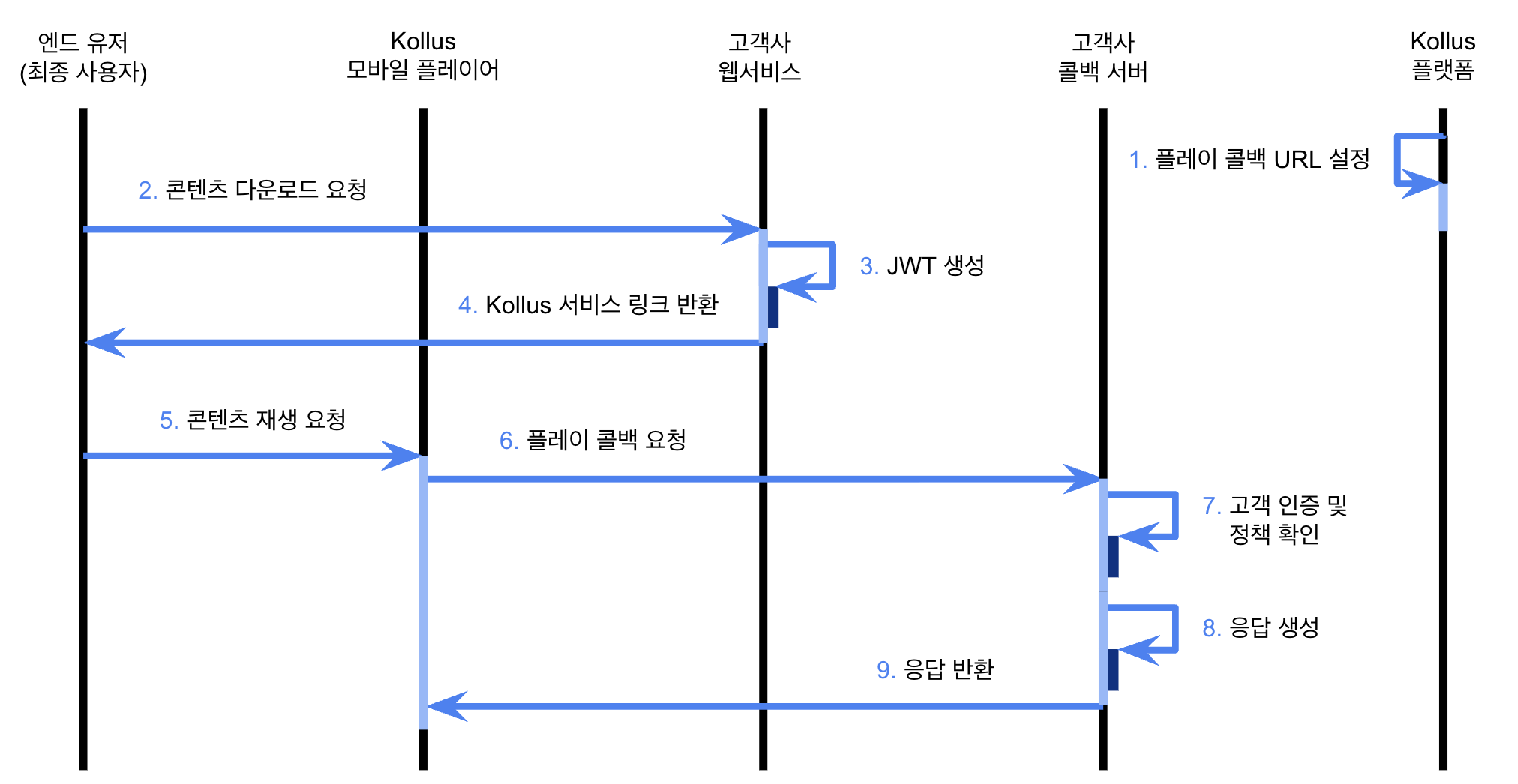
⚠️주의
- 응답 규격: 콜백 서버의 응답 데이터는 반드시 JWT(JSON Web Token) 형식으로 반환되어야 합니다.
- 헤더 인증: HTTP 응답 헤더에 사용자 키(
X-KOLLUS-USERKEY)를 반드시 포함해야 합니다.- 확인 경로:
Kollus VOD 콘솔 > [서비스 계정] > [사용자 키]
- 확인 경로:
- 데이터 타입: JSON 내 모든 정수형 필드(
expiration_date,result,content_expired등)은 integer 타입으로 전달해야 합니다. ("1"과 같이 string 타입으로 전송 시 처리 실패)
콜백 유형
플레이 콜백은 호출 시점과 목적에 따라 두 가지 유형으로 구분됩니다.
kind1(재생 만료 설정): 재생 시작 전, 시청자의 재생 가능 기한을 동적으로 할당합니다.kind3(최종 재생 승인): 플레이어 준비 완료 직후, 현재 시점의 재생 권한을 최종 확인합니다.
요청 규격
전송 방식
- Method:
POST - Content-Type:
application/x-www-form-urlencoded - Data Format: FormData
요청 파라미터
| 파라미터 | 타입 | 필수 여부 | 설명 |
|---|---|---|---|
kind | integer | ◯ | 플레이 콜백 유형
|
client_user_id | string | ◯ | 시청자 ID (JWT 생성 시 입력한 client_user_id) |
player_id | string | ◯ | 시청 기기 고유 식별자 |
hardware_id | string | - | 시청 기기 하드웨어 시리얼 넘버 (Windows 환경 등 식별 가능한 값이 존재하는 경우 제공) |
device_name | string | - | 시청 기기 모델명 |
media_content_key | string | ◯ | 미디어 콘텐츠 키 |
localtime | integer | - | 시청 기기 기준 UTC 시간 |
uservalues | JSON string | - | 고객사 정의 값 (uservalue0~uservalue99) |
uservalues 예시
{
  "uservalue0": "class_code_01",
  "uservalue1": "product_code_02",
  "uservalue99": "custom_code_03"
}
응답 규격
kind1 응답 필드
kind1 응답은 시청자의 권한을 정의하고, 보안 옵션(캡처 차단, 가상머신 체크 등)을 동적으로 제어하는 데 사용됩니다.
data 항목
⚠️주의
설정된 만료 일시(expiration_date)는 Kollus 시스템에 기록된 후 수정 또는 회수가 불가능합니다. 반드시 정확한 Unix Timestamp 값을 할당하세요.
| 필드 | 타입 | 필수 여부 | 설명 |
|---|---|---|---|
expiration_date | integer | ◯ | 재생 만료 일시 (Unix Timestamp)
|
result | integer | ◯ | 승인 결과
|
message | string | - | 재생 차단(result: 0) 시 플레이어 화면에 노출할 안내 메시지
|
vmcheck | integer | - | (Html5 Player for PC 전용) 가상머신(VM) 환경 재생 허용 여부
|
disable_tvout | integer | - | 외부 디스플레이 출력 허용 여부 (채널 기본 정책보다 우선 적용)
|
expiration_playtime | integer | - | 재생 제한 시간 (초)
|
cpcheck | integer | - | 캡처 프로그램 감지 기능 활성화 여부 (PC)
|
exp 항목
| 필드 | 타입 | 필수 여부 | 설명 |
|---|---|---|---|
exp | integer | - | JWT 만료 일시 (Unix Timestamp) |
kind1 응답 예시
{
  "data" : {
    "expiration_date": 1402444800,
    "vmcheck": 1,
    "disable_tvout": 1,
    "expiration_playtime": 1800,
    "result": 1
  },
  "exp" : 1477558242
}
kind3 응답 필드
kind3 응답은 재생 직전 사용자의 현재 권한 상태를 최종 확인하는 용도로 사용됩니다.
data 항목
| 필드 | 타입 | 필수 여부 | 설명 |
|---|---|---|---|
content_expired | integer | - | 재생 만료 여부
|
result | integer | ◯ | 승인 결과 (result 값이 content_expired 설정보다 우선 적용됩니다.)
|
message | string | - | 재생 차단(result: 0 또는 content_expired: 1) 시 플레이어에 노출할 안내 메시지
|
exp 항목
| 필드 | 타입 | 필수 여부 | 설명 |
|---|---|---|---|
exp | integer | - | JWT 만료 일시 (Unix Timestamp) |
kind3 응답 예시
{
  "data" : {
    "content_expired": 1,
    "result": 1
  },
  "exp" : 1477558242
}
Java/Spring 사용 예제
JWT 인코딩 예제
Kollus의 응답 규격에 맞춰 헤더와 페이로드를 생성하고 HS256 알고리즘으로 서명하는 컴포넌트입니다.
import javax.crypto.Mac;
import javax.crypto.spec.SecretKeySpec;
import java.nio.charset.StandardCharsets;
import java.util.*;
import com.fasterxml.jackson.databind.ObjectMapper;

/**
 * Custom JWT Encoder for Kollus
 */
public class KollusJwtEncoder {

  private final ObjectMapper objectMapper = new ObjectMapper();

  public String encode(Map<String, Object> payload, String key) throws Exception {
    // 1. Construct the header
    Map<String, String> header = new HashMap<>();
    header.put("alg", "HS256");
    header.put("typ", "JWT");

    String headerJson = objectMapper.writeValueAsString(header);
    String payloadJson = objectMapper.writeValueAsString(payload);

    // 2. Base64Url encode (without padding)
    String encodedHeader = Base64.getUrlEncoder().withoutPadding()
      .encodeToString(headerJson.getBytes(StandardCharsets.UTF_8));
    String encodedPayload = Base64.getUrlEncoder().withoutPadding()
      .encodeToString(payloadJson.getBytes(StandardCharsets.UTF_8));
    String unsignedToken = encodedHeader + "." + encodedPayload;

    // 3. Generate HS256 signature
    Mac hmac = Mac.getInstance("HmacSHA256");
    SecretKeySpec secretKey = new SecretKeySpec(key.getBytes(StandardCharsets.UTF_8), "HmacSHA256");
    hmac.init(secretKey);
    byte[] signatureBytes = hmac.doFinal(unsignedToken.getBytes(StandardCharsets.UTF_8));

    String signature = Base64.getUrlEncoder().withoutPadding()
      .encodeToString(signatureBytes);

    return unsignedToken + "." + signature;
  }
}
Spring Boot 플레이 콜백 예제
Kollus 서버로부터의 POST 요청을 수신하여 플레이 콜백 유형별로 비즈니스 로직을 처리하는 예제입니다.
import org.springframework.boot.SpringApplication;
import org.springframework.boot.autoconfigure.SpringBootApplication;
import org.springframework.http.HttpHeaders;
import org.springframework.http.MediaType;
import org.springframework.http.ResponseEntity;
import org.springframework.web.bind.annotation.*;

import java.time.Instant;
import java.util.*;

@SpringBootApplication
@RestController
public class KollusPlayCallbackApplication {

  private static final String KOLLUS_KEY = "{CUSTOM_KEY}";
  private static final String JWT_KEY = "{SECURITY_KEY}";

  private final KollusJwtEncoder jwtEncoder = new KollusJwtEncoder();

  /**
   * Endpoint to receive play callbacks
   */
  @PostMapping("/play/callback")
  public ResponseEntity<String> playCallback(
      @RequestParam("kind") Integer kind,
      @RequestParam("client_user_id") String clientUserId,
      @RequestParam("player_id") String playerId,
      @RequestParam(value = "device_name", required = false) String deviceName,
      @RequestParam("media_content_key") String mediaContentKey,
      @RequestParam(value = "hardware_id", required = false) String hardwareId,
      @RequestParam(value = "uservalues", required = false) String uservalues,
      @RequestParam(value = "localtime", required = false) Long localtime) {

    try {
      System.out.println("Play Callback - kind: " + kind +
                        ", user: " + clientUserId +
                        ", media: " + mediaContentKey);

      Map<String, Object> responseData;

      // Logic branching by callback type (kind 1: Expiration settings, kind 3: Final approval)
      if (kind == 1) {
        responseData = processKind1(clientUserId, mediaContentKey);
      } else if (kind == 3) {
        responseData = processKind3(clientUserId, playerId, mediaContentKey);
      } else {
        responseData = createErrorResponse("Invalid kind");
      }

      // Sign the response data
      String jwtToken = jwtEncoder.encode(responseData, JWT_KEY);

      // Configure response headers (Required: X-Kollus-UserKey)
      HttpHeaders headers = new HttpHeaders();
      headers.set("X-Kollus-UserKey", KOLLUS_KEY);
      headers.setContentType(MediaType.TEXT_PLAIN);

      return ResponseEntity.ok().headers(headers).body(jwtToken);

    } catch (Exception e) {
      e.printStackTrace();
      return ResponseEntity.internalServerError().body("Error processing callback");
    }
  }

  /**
   * kind1 (Playback expiration settings)
   */
  private Map<String, Object> processKind1(String clientUserId, String mediaContentKey) {
    // TODO: Verify user and content permissions in the database

    Map<String, Object> data = new HashMap<>();
    data.put("result", 1);
    data.put("expiration_date", Instant.now().getEpochSecond() + 86400); // 1 day
    data.put("vmcheck", 1);
    data.put("disable_tvout", 0);
    data.put("expiration_playtime", 1800); // 30 minutes
    data.put("cpcheck", 1);

    Map<String, Object> response = new HashMap<>();
    response.put("data", data);
    response.put("exp", Instant.now().getEpochSecond() + 3600); // JWT valid for 1 hour

    return response;
  }

  /**
   * kind3 (Final playback approval)
   */
  private Map<String, Object> processKind3(String clientUserId, String playerId,
                                          String mediaContentKey) {
    // TODO: Verify playback permissions and expiration status in the database

    Map<String, Object> data = new HashMap<>();
    data.put("result", 1);
    data.put("content_expired", 0); // 0: Playable, 1: Playback blocked

    Map<String, Object> response = new HashMap<>();
    response.put("data", data);
    response.put("exp", Instant.now().getEpochSecond() + 3600);

    return response;
  }

  /**
   * Create error response
   */
  private Map<String, Object> createErrorResponse(String message) {
    Map<String, Object> data = new HashMap<>();
    data.put("result", 0);
    data.put("message", message);

    Map<String, Object> response = new HashMap<>();
    response.put("data", data);

    return response;
  }

  public static void main(String[] args) {
    pringApplication.run(KollusPlayCallbackApplication.class, args);
  }
}